Table of Contents
Open Table of Contents
Introduction
In my previous post on MCP, I explored the Model Context Protocol and how it bridges the gap between AI and external systems. Now, let’s put that knowledge into practice by building RedTeam MCP - an MCP server that enables AI assistants like Claude to orchestrate penetration testing tools.
This project serves a dual purpose:
- Learning TypeScript from a Python background (see my TypeScript for Pythonistas guide)
- Building a practical security tool that demonstrates MCP’s power
⚠️ Disclaimer: This tool is for authorized security testing only. Always ensure you have explicit permission before scanning any target.
The Vision
Imagine doing HackTheBox machines with an AI assistant that understands your workflow:
User: "I'm starting a new HTB machine at 10.10.10.123. Help me enumerate it."

Claude: I'll begin reconnaissance.

[Uses port_scan] → Found: 22/SSH, 80/HTTP, 443/HTTPS
[Uses tech_detect] → Apache 2.4.41, PHP 7.4.3, WordPress 5.9.1
[Uses subdomain_enum] → Found: admin.target.htb, dev.target.htb
[Uses vuln_scan] → Critical: CVE-2024-XXXX on admin.target.htb

Recommendation: Research CVE-2024-XXXX for potential exploitation.
The AI handles the tedious enumeration while you focus on the interesting parts: understanding the target and crafting exploits.
Architecture
At its core, the pattern is simple: the LLM never touches the tools directly. It speaks MCP to a server, and the server is what executes anything.

In practice, RedTeam MCP expands that middle box into a layered architecture:
graph TB
    Client["MCP Client<br/>(Claude Desktop / LangGraph Agent)"]
    Server["MCP Server (redteam-mcp)"]

    Tasks["Task Tools<br/>port_scan · vuln_scan · directory_fuzz<br/>subdomain_enum · vhost_fuzz · tech_detect"]
    Low["Low-Level Tools<br/>nmap · nuclei<br/>httpx · whatweb"]
    Prompts["Prompts (Playbooks)<br/>htb_initial_recon · web_enumeration<br/>subdomain_discovery · quick_scan"]

    Guard["Security Guardrails<br/>Target Whitelisting · Rate Limiting<br/>Audit Logging · Input Validation"]
    Tools["Security Tools<br/>nmap | nuclei | ffuf | httpx | whatweb"]

    Client -->|MCP Protocol| Server
    Server --> Tasks
    Server --> Low
    Server --> Prompts
    Tasks --> Guard
    Low --> Guard
    Prompts --> Guard
    Guard -->|CLI Wrappers| Tools
Design Decisions
Why MCP and Not Just Function Calling?
The obvious objection: every major provider already supports function calling. Why add a protocol on top?
Because function calling couples the tools to whoever is calling them. Define
port_scan as an OpenAI tool schema and you have an OpenAI tool. Move to Claude,
and you rewrite the schema. Move to a local model, rewrite again. The scanner
logic never changed — only the wrapper around it did.
MCP inverts that. The server declares what it offers, and any client that speaks the protocol can consume it:
| Concern | Function calling | MCP server |
|---|---|---|
| Tool schema | Per-provider format | Declared once, provider-agnostic |
| Reuse | Bound to one app | Any MCP client |
| Process boundary | Usually in-process | Separate process, own privileges |
| Playbooks | App-level strings | First-class prompts primitive |
| Adding a tool | Redeploy the app | Client re-lists at runtime |
That reuse is not theoretical here. The exact same server binary is what the MCP Inspector drives in the screenshots below, what Claude Desktop connects to, and what the LangGraph agent will connect to later — with no changes to the scanning code.
The process boundary matters more than usual for this project. The tools shell out
to nmap and nuclei, so keeping them behind a separate process means the
scanners run with their own privileges and their own failure domain, rather than
inside whatever is orchestrating the conversation.
To be fair about the trade-off: if you are building one feature, in one app, on one provider, function calling is less machinery and you should just use it. MCP starts paying off when the tool is meant to outlive the app that first used it — which is exactly the case for a pentesting toolkit you will reuse across clients and workflows for years.
Task-Oriented vs Tool-Oriented
A key insight: the AI doesn’t need to know which tool to use, just what task to accomplish.
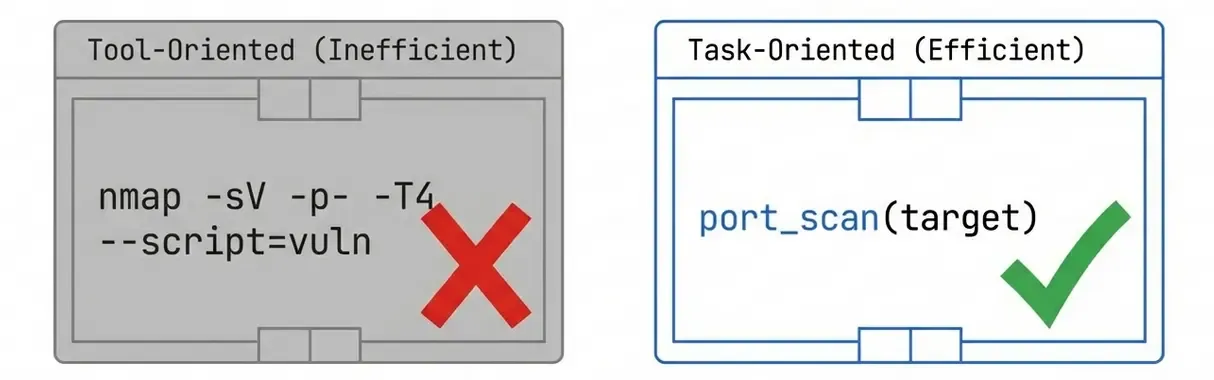
❌ Tool-Oriented (Bad):
# AI must know ffuf's Host header fuzzing syntax
ffuf -u http://target.htb -H "Host: FUZZ.target.htb" -w wordlist.txt
✅ Task-Oriented (Good):
subdomain_enum --domain target.htbWe built 6 task-oriented tools that abstract the underlying complexity:
| Tool | Underlying Implementation |
|---|---|
subdomain_enum | ffuf with Host header fuzzing |
directory_fuzz | ffuf with path fuzzing |
vhost_fuzz | ffuf targeting IP with Host variations |
port_scan | nmap with version detection |
tech_detect | httpx + whatweb combination |
vuln_scan | nuclei with severity filters |
For power users, we also expose the low-level tools (nmap, nuclei, httpx, whatweb) with full options.
Taming Tool Output
Task-oriented tools solve the input side. The output side is where most of the real engineering went.
Scanners are written for a human reading a terminal. An aggressive nmap run
against a single host emits banner grabs, script output, timing data, TTLs and
fingerprint blobs; nuclei and ffuf will happily emit a JSON object per request.
Piping that straight into the model has three distinct problems: it burns context
the agent needs for reasoning, it buries the two or three facts that actually drive
the next decision, and it drags formatting noise into the conversation that the
model then wastes effort interpreting.
The rule we settled on: the tool owns the parsing, and the model never sees a raw scanner format.
1. Ask for machine-readable output. Every one of these tools has a structured mode. Never regex a human-facing format that was never meant to be stable:
const OUTPUT_FORMATS = {
  nmap: ["-oX", "-"], // XML on stdout
  nuclei: ["-jsonl"], // one JSON object per finding
  ffuf: ["-of", "json"], // structured results
};
2. Project down to what drives the next decision. For a port scan, that is the port, protocol, service and version. Not the TTL, not the reason, not the fingerprint blob:
interface DiscoveredPort {
  port: number;
  proto: "tcp" | "udp";
  service: string;
  product?: string;
  version?: string;
}
3. Render compactly. JSON is a poor wire format for a context window — repeated keys and punctuation are pure overhead. A terse table carries the same information:
10.10.10.123
22/tcp   ssh    OpenSSH 8.2p1
80/tcp   http   Apache 2.4.41
443/tcp  https  Apache 2.4.41
4. Truncate loudly. Long result lists still need a cap, but a silent cap is worse than no cap: the model treats what it sees as the complete picture and reasons from a false premise. Say what was dropped and how to ask for the rest:
Showing 20 of 143 discovered paths, ranked by status code.
Call directory_fuzz with a narrower filter to see the remainder.
5. Keep the raw output retrievable. Trimming is for the context window, not for the evidence. Each run writes its full output to disk and the tool returns the path, so findings stay auditable and you can go back to the original when the summary isn’t enough.
There’s a consequence here worth flagging. Everything crossing this boundary is attacker-influenced: service banners, page titles and HTTP headers are all content the target controls. Normalizing output is therefore also the point where you decide what a scanned host is allowed to say to your agent — a problem that deserves its own post.
Safety Guardrails
With great power comes great responsibility. We implemented multiple layers of protection:
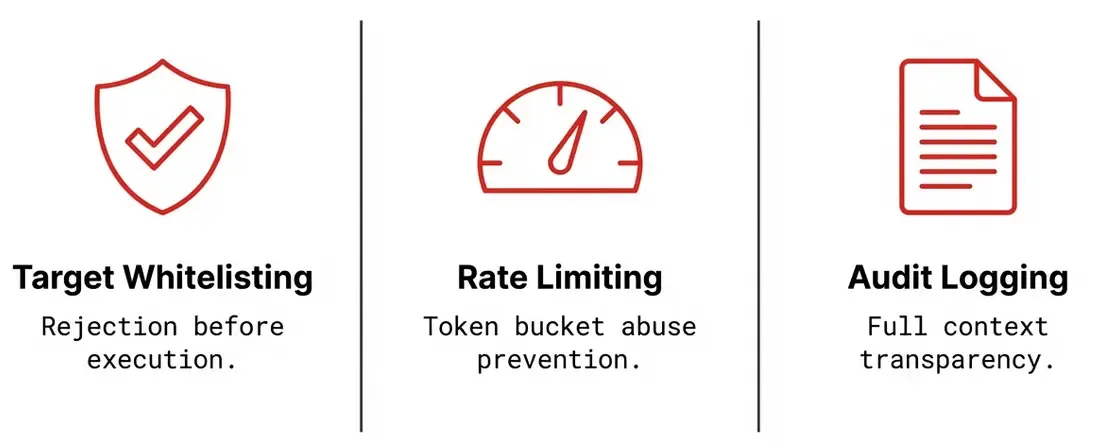
1. Target Whitelisting
const ALLOWED_TARGETS = [
  "*.htb", // HackTheBox domains
  "*.thm", // TryHackMe domains
  "10.10.10.*", // HTB IP range
  "10.10.11.*", // HTB IP range
  "*.lab.internal", // Local labs
];
Any target not matching these patterns is rejected before execution.
2. Rate Limiting
Token bucket algorithm prevents abuse:
const LIMITS = {
  port_scan: { maxTokens: 5, refillRate: 0.1 }, // 5 scans, refill 1/10sec
  vuln_scan: { maxTokens: 3, refillRate: 0.05 }, // 3 scans, refill 1/20sec
};
3. Audit Logging
Every invocation is logged with full context:
{
  "id": "audit-1706000000000-abc123",
  "timestamp": "2025-01-26T12:00:00Z",
  "action": "scan_started",
  "tool": "port_scan",
  "target": "10.10.10.123",
  "result": "success",
  "duration": 45200
}
Implementation Highlights
TypeScript for Security Tools
Half the point of this project was learning TypeScript from a Python background. Three things transferred differently than I expected.
Zod is not quite Pydantic. Both validate at runtime, but the direction of inference is reversed. In Pydantic the class is the source of truth and the runtime object; in Zod the schema is the source of truth, and the static type is derived from it:
const NmapInput = z.object({
  target: z.string().describe("Target IP or hostname"),
  scanType: z.enum(["quick", "default", "version", "aggressive"]),
  timing: z.enum(["T0", "T1", "T2", "T3", "T4", "T5"]).default("T4"),
});

type NmapInput = z.infer<typeof NmapInput>; // derived, never hand-written
That single declaration does three jobs: it validates input at runtime, it gives
runNmapScan a compile-time parameter type, and the MCP SDK converts it into the
JSON Schema the model sees. Which means those .describe() strings aren’t comments
— they’re the documentation the LLM reads when deciding whether to call the
tool. Getting them wrong is a functional bug, not a style nit.
Shelling out is where TypeScript nearly bit me. Python’s subprocess.run takes
an argument list by default and you must opt into a shell with shell=True. Node’s
child_process offers both, and the more discoverable one is the dangerous one:
// ❌ exec() interpolates through a shell
exec(`nmap -sV ${target}`); // target = "10.10.10.1; rm -rf ~"

// ✅ execFile() takes an argv array — no shell, no interpolation
await execFile("nmap", ["-sV", target], { timeout: 300_000 });
For a tool whose inputs are hostnames arriving from a conversation, that difference is the difference between a scanner and a remote shell. The target whitelist from the previous section should reject a payload like that long before it reaches here — which is precisely why both layers exist rather than just one.
Types vanish at runtime, and that took adjusting to. A Pydantic model is a real
object you can carry around and introspect; a TypeScript interface is erased at
compile time. The DiscoveredPort from earlier doesn’t exist when the code runs, so
anything crossing a boundary — parsed nmap XML, a tool argument, a JSON file
on disk — still needs validating by something that survives to runtime.
Coming from Python, I kept reaching for a type where what I actually needed was a
schema.
Wiring a validated schema into the server is then mechanical:
server.registerTool(
  "port_scan",
  {
    description: "Scan for open ports and services",
    inputSchema: { target, scanType, timing },
  },
  async input => {
    const result = await runNmapScan(input);
    return { content: [{ type: "text", text: formatResult(result) }] };
  }
);
Workflow Prompts
MCP supports prompts - pre-defined workflows the AI can follow:
const PROMPTS = [
  {
    name: "htb_initial_recon",
    description: "Complete HTB machine reconnaissance",
    template: `
    1. Port scan with version detection
    2. Technology detection on web services
    3. Subdomain enumeration if domain found
    4. Vulnerability scan on discovered services
  `,
  },
];
Project Structure
redteam-mcp/
├── src/
│   ├── index.ts              # MCP server (10 tools + 4 prompts)
│   ├── tools/
│   │   ├── fuzzing.ts        # subdomain, directory, vhost fuzzing
│   │   ├── nmap.ts           # Port scanning
│   │   ├── nuclei.ts         # Vulnerability scanning
│   │   └── httpx.ts          # HTTP probing
│   ├── prompts/
│   │   └── playbooks.ts      # Enumeration workflows
│   └── utils/
│       ├── validation.ts     # Target whitelisting
│       ├── rateLimiter.ts    # Token bucket rate limiting
│       └── logger.ts         # Audit logging
├── exercises/                # TypeScript learning exercises
├── docs/
│   └── SECURITY.md          # Security guardrails documentation
└── examples/
    ├── htb-machine-workflow.md  # Demo walkthrough
    └── quick-examples.md        # Quick reference
Testing with MCP Inspector
Before connecting to an AI agent, test your server with MCP Inspector:
cd redteam-mcp
npm run build
npx @modelcontextprotocol/inspector node ./build/index.js
The Inspector boots a proxy and hands you a pre-authenticated URL:
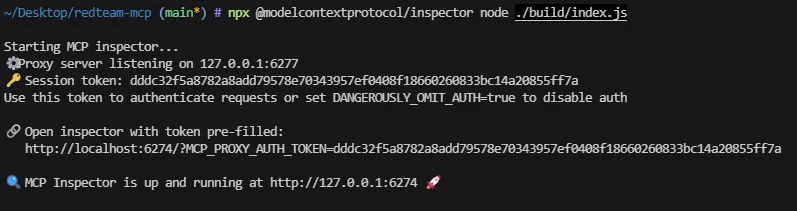
This opens a web UI where you can:
- View all registered tools and prompts
- Execute tools with custom parameters
- Inspect JSON-RPC messages
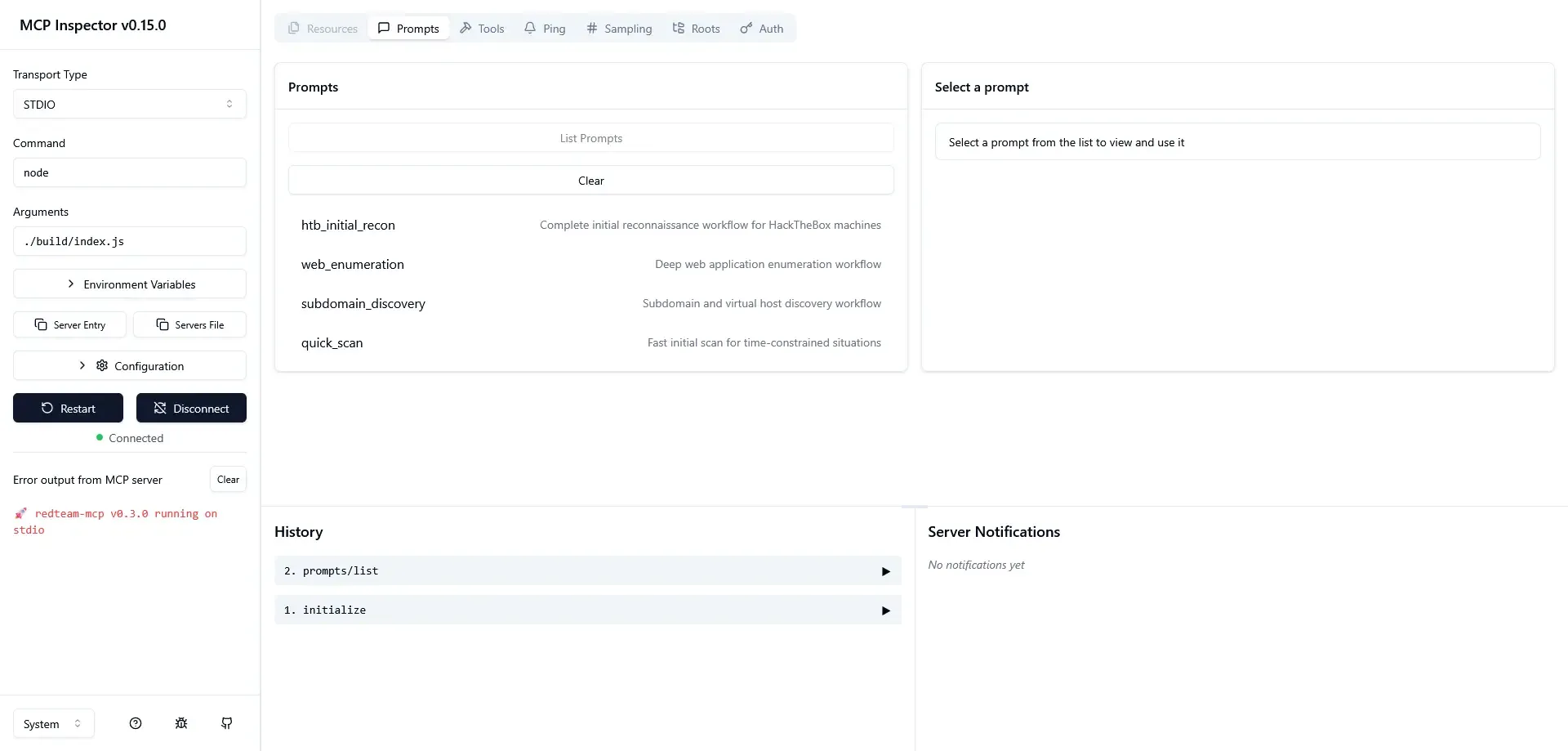
Here you can see the four playbooks registered by the server —
htb_initial_recon, web_enumeration, subdomain_discovery and quick_scan
— all reachable by the agent as MCP prompts.
What’s Next
This post covered the MCP Server — the tool provider. The next phase of the project is the Agent built with LangGraph that:
- Connects to the MCP server
- Decides which tools to use based on context
- Analyzes outputs and plans next steps
- Maintains state across the reconnaissance workflow
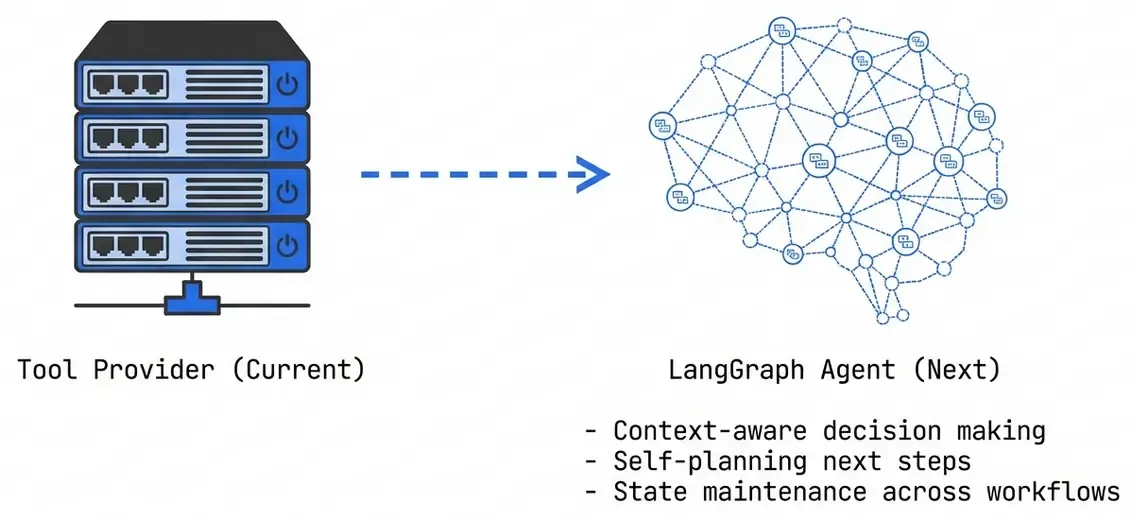
The agent wraps this server in a StateGraph that can loop back on itself when
a step doesn’t yield enough information:
graph TB
    subgraph Agent["LangGraph Agent"]
        direction LR
        Recon[Recon] --> Enum[Enum] --> Analyze[Analyze] --> Report[Report]
        Analyze -->|Need More Info| Recon
    end

    Agent --> MCPClient["MCP Client"]
    MCPClient --> ServerRef["RedTeam MCP Server (this post)"]
Resources
- Source Code: github.com/manulqwerty/redteam-mcp
- MCP Documentation: modelcontextprotocol.io
- TypeScript for Pythonistas: Previous Post
- MCP Introduction: Previous Post
Conclusion
RedTeam MCP demonstrates how MCP can bridge AI assistants and specialized security tools. The key takeaways:
- Task-oriented design makes tools AI-friendly
- Output normalization matters as much as input design — the tool should own the parsing so the model never sees a raw scanner format
- Safety guardrails are non-negotiable for security tools, and they belong at more than one layer
- TypeScript + Zod gives you runtime validation, static types and the schema the model reads from a single declaration
- MCP’s architecture cleanly separates concerns, and buys reuse across every client that speaks the protocol
With proper safeguards, AI-assisted penetration testing isn’t just possible - it’s practical. The tedious enumeration phase becomes conversational, letting you focus on the creative aspects of security research.
The next phase of the project will complete the picture with a LangGraph agent that orchestrates this MCP server autonomously.