Table of Contents
Open Table of Contents
- Introduction
- LangGraph Fundamentals
- Pattern 1: Prompt Chaining
- Pattern 2: Parallelization
- Pattern 3: Routing
- Pattern 4: Orchestrator-Worker
- Pattern 5: Evaluator-Optimizer
- Pattern 6: ReAct Agents
- Pattern 7: Supervisor Multi-Agent
- Pattern 8: Hierarchical Teams
- Pattern Selection Guide
- Conclusions
- Resources
Introduction
In the world of generative AI, building robust and scalable agents requires understanding when to use each architectural pattern. Not every problem needs a complex multi-agent system; sometimes a simple workflow is more efficient and maintainable.
LangGraph is the de facto framework for building production agents. Unlike high-level abstractions, LangGraph gives you full control over execution flow through state graphs.
Why LangGraph?
| Feature | Description |
|---|---|
| Durable Execution | Agents persist through failures and can run for extended periods |
| Human-in-the-loop | Incorporate human oversight by inspecting and modifying state at any point |
| Comprehensive Memory | Short-term working memory for reasoning and long-term memory across sessions |
| Debugging with LangSmith | Trace visualization, state transitions, and runtime metrics |
What You’ll Learn
In this post, we’ll cover 8 architectural patterns ordered from simplest to most complex:
graph LR
    A[Prompt Chaining] --> B[Parallelization]
    B --> C[Routing]
    C --> D[Orchestrator-Worker]
    D --> E[Evaluator-Optimizer]
    E --> F[ReAct Agents]
    F --> G[Supervisor]
    G --> H[Hierarchical Teams]

    style A fill:#22c55e
    style B fill:#22c55e
    style C fill:#84cc16
    style D fill:#eab308
    style E fill:#eab308
    style F fill:#f97316
    style G fill:#ef4444
    style H fill:#ef4444
💡 Golden Rule: Use the simplest pattern that solves your problem. Added complexity is only justified when it provides concrete value.
LangGraph Fundamentals
Before the patterns, let’s understand the core concepts.
Key Concepts
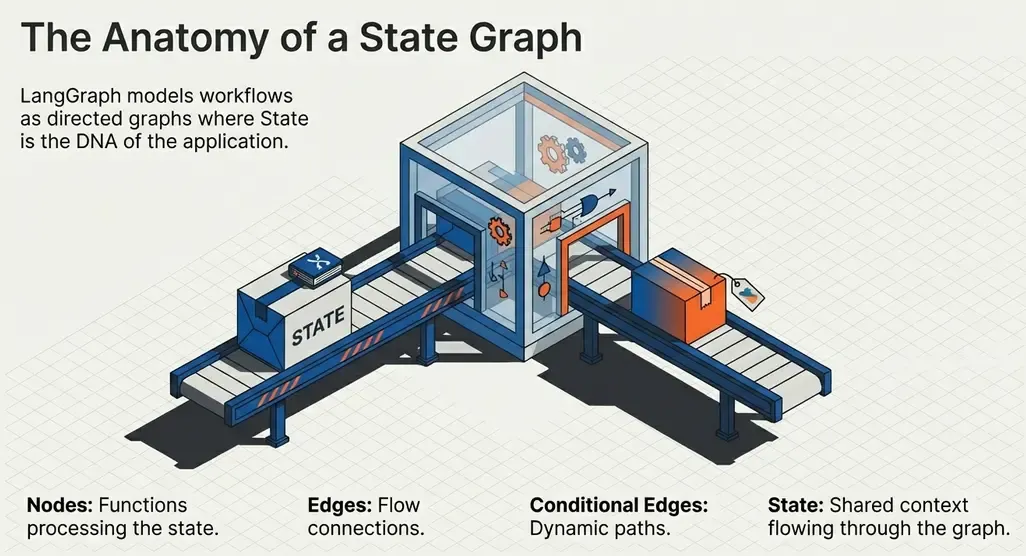
LangGraph models workflows as directed graphs where:
- Nodes: Functions that process state (can invoke LLMs, tools, or pure logic)
- Edges: Connections between nodes that define the flow
- State: Typed dictionary that flows through the graph
- Conditional Edges: Edges that depend on state to decide the next node
from langgraph.graph import StateGraph, START, END
from typing_extensions import TypedDict

# 1. Define state
class State(TypedDict):
    input: str
    output: str

# 2. Define nodes (functions)
def process(state: State) -> dict:
    return {"output": state["input"].upper()}

# 3. Build the graph
graph = StateGraph(State)
graph.add_node("process", process)
graph.add_edge(START, "process")
graph.add_edge("process", END)

# 4. Compile and execute
app = graph.compile()
result = app.invoke({"input": "hello"})
# Output: {"input": "hello", "output": "HELLO"}
Workflows vs Agents
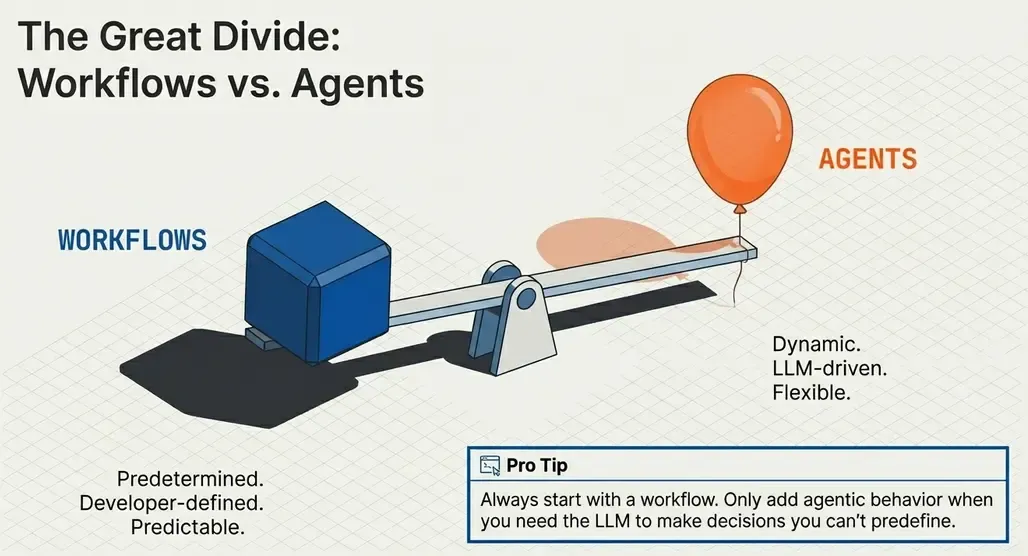
This is the most important distinction:
| Workflows | Agents |
|---|---|
| Predetermined flow | Dynamic flow |
| Logic defined by developer | LLM decides what to do |
| Predictable and easy to debug | Flexible but less predictable |
| Lower latency and cost | Higher latency and cost |
graph TB
    subgraph Workflow
        W1[Step 1] --> W2[Step 2] --> W3[Step 3]
    end

    subgraph Agent
        A1[LLM] -->|Tool Call| T1[Tool]
        T1 -->|Result| A1
        A1 -->|Another Call?| A1
        A1 -->|Done| A2[Response]
    end
⚠️ Pro tip: Always start with a workflow. Only add agentic behavior when you need the LLM to make decisions you can’t predefine.
Pattern 1: Prompt Chaining
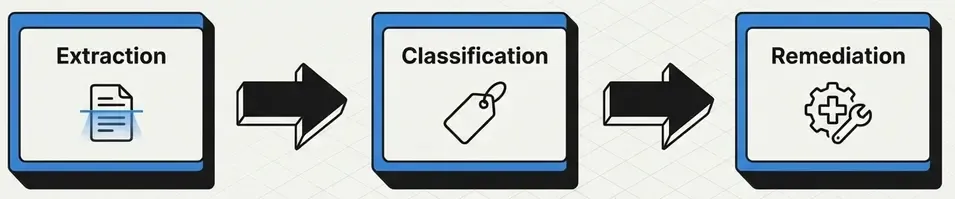
The simplest pattern: a sequence of LLM calls where the output of one feeds the next.
When to Use
- Tasks requiring multiple transformation steps
- Each step needs different reasoning
- The flow is predictable
Use Case: Vulnerability Analysis Pipeline
Imagine a pipeline that processes vulnerability reports:
- Extraction: Extract structured information from the report
- Classification: Determine severity and type
- Remediation: Generate recommendations
from typing_extensions import TypedDict
from langgraph.graph import StateGraph, START, END

class VulnState(TypedDict):
    raw_report: str
    extracted_info: str
    classification: str
    remediation: str

def extract_info(state: VulnState) -> dict:
    """Extract structured information from the report."""
    msg = llm.invoke(
        f"Extract CVE, affected systems, and attack vector from:\n{state['raw_report']}"
    )
    return {"extracted_info": msg.content}

def classify_vuln(state: VulnState) -> dict:
    """Classify the vulnerability."""
    msg = llm.invoke(
        f"Classify this vulnerability by CVSS score and type:\n{state['extracted_info']}"
    )
    return {"classification": msg.content}

def generate_remediation(state: VulnState) -> dict:
    """Generate remediation recommendations."""
    msg = llm.invoke(
        f"Generate remediation steps for:\n{state['extracted_info']}\nClassification: {state['classification']}"
    )
    return {"remediation": msg.content}

# Build the workflow
workflow = StateGraph(VulnState)
workflow.add_node("extract", extract_info)
workflow.add_node("classify", classify_vuln)
workflow.add_node("remediate", generate_remediation)

workflow.add_edge(START, "extract")
workflow.add_edge("extract", "classify")
workflow.add_edge("classify", "remediate")
workflow.add_edge("remediate", END)

chain = workflow.compile()
With Gates (Conditional Validation)
We can add conditional edges for flow control:
def validate_extraction(state: VulnState) -> str:
    """Gate: validate if extraction was successful."""
    if "CVE-" in state["extracted_info"]:
        return "valid"
    return "invalid"

workflow.add_conditional_edges(
    "extract",
    validate_extraction,
    {"valid": "classify", "invalid": END}  # If fails, terminate
)
graph LR
START --> Extract
Extract -->|Valid| Classify
Extract -->|Invalid| END
Classify --> Remediate
Remediate --> END
Pattern 2: Parallelization
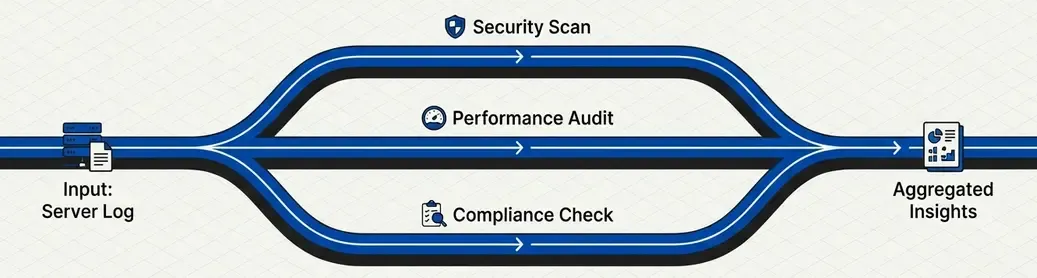
Execute multiple tasks simultaneously when they’re independent of each other.
When to Use
- Subtasks that don’t depend on each other
- Need to reduce total latency
- Want multiple perspectives on the same input
Use Case: Multi-Perspective Log Analysis
Analyze the same log from different angles in parallel:
from typing import Annotated
import operator

class AnalysisState(TypedDict):
    log_entry: str
    threat_analysis: str
    compliance_check: str
    performance_impact: str
    summary: str

def analyze_threats(state: AnalysisState) -> dict:
    """Analyze security threats."""
    msg = llm.invoke(f"Analyze security threats in:\n{state['log_entry']}")
    return {"threat_analysis": msg.content}

def check_compliance(state: AnalysisState) -> dict:
    """Check compliance (GDPR, PCI-DSS, etc.)."""
    msg = llm.invoke(f"Check compliance violations in:\n{state['log_entry']}")
    return {"compliance_check": msg.content}

def assess_performance(state: AnalysisState) -> dict:
    """Assess performance impact."""
    msg = llm.invoke(f"Assess performance impact from:\n{state['log_entry']}")
    return {"performance_impact": msg.content}

def synthesize(state: AnalysisState) -> dict:
    """Synthesize all analyses."""
    summary = f"""
    ## Analysis Summary

    **Threats**: {state['threat_analysis']}
    **Compliance**: {state['compliance_check']}
    **Performance**: {state['performance_impact']}
    """
    return {"summary": summary}

# Build parallel workflow
parallel = StateGraph(AnalysisState)
parallel.add_node("threats", analyze_threats)
parallel.add_node("compliance", check_compliance)
parallel.add_node("performance", assess_performance)
parallel.add_node("synthesize", synthesize)

# Fan-out: START connects to all in parallel
parallel.add_edge(START, "threats")
parallel.add_edge(START, "compliance")
parallel.add_edge(START, "performance")

# Fan-in: All connect to synthesizer
parallel.add_edge("threats", "synthesize")
parallel.add_edge("compliance", "synthesize")
parallel.add_edge("performance", "synthesize")
parallel.add_edge("synthesize", END)

parallel_analyzer = parallel.compile()
graph TB
START --> Threats
START --> Compliance
START --> Performance
Threats --> Synthesize
Compliance --> Synthesize
Performance --> Synthesize
Synthesize --> END
💡 Key benefit: If each analysis takes 2 seconds, sequentially it would be 6 seconds. In parallel, only 2 seconds.
Pattern 3: Routing
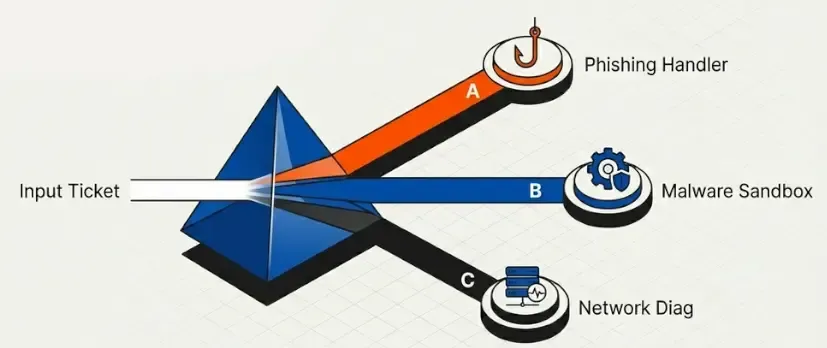
The LLM decides which path to take based on the input content.
When to Use
- Different input types require different processing
- You want specialization by task type
- The type can’t be determined with simple rules
Use Case: SOC Ticket Router
Classify and route security support tickets:
from pydantic import BaseModel, Field
from typing import Literal

# Schema for structured routing
class TicketRoute(BaseModel):
    category: Literal["incident", "vulnerability", "access_request", "general"] = Field(
        description="Ticket category"
    )
    priority: Literal["critical", "high", "medium", "low"] = Field(
        description="Ticket priority"
    )
    reasoning: str = Field(description="Classification justification")

# LLM with structured output
router = llm.with_structured_output(TicketRoute)

class TicketState(TypedDict):
    ticket: str
    route: str
    response: str

def classify_ticket(state: TicketState) -> dict:
    """Classify the ticket using structured output."""
    route = router.invoke(
        f"Classify this security ticket:\n{state['ticket']}"
    )
    return {"route": route.category}

def handle_incident(state: TicketState) -> dict:
    msg = llm.invoke(f"Handle as INCIDENT:\n{state['ticket']}")
    return {"response": f"🚨 INCIDENT RESPONSE:\n{msg.content}"}

def handle_vulnerability(state: TicketState) -> dict:
    msg = llm.invoke(f"Handle as VULNERABILITY:\n{state['ticket']}")
    return {"response": f"🔍 VULN ASSESSMENT:\n{msg.content}"}

def handle_access(state: TicketState) -> dict:
    msg = llm.invoke(f"Handle as ACCESS REQUEST:\n{state['ticket']}")
    return {"response": f"🔐 ACCESS REVIEW:\n{msg.content}"}

def handle_general(state: TicketState) -> dict:
    msg = llm.invoke(f"Handle as GENERAL QUERY:\n{state['ticket']}")
    return {"response": f"ℹ️ GENERAL:\n{msg.content}"}

def route_ticket(state: TicketState) -> str:
    """Routing function based on classification."""
    return state["route"]

# Build router
router_graph = StateGraph(TicketState)
router_graph.add_node("classify", classify_ticket)
router_graph.add_node("incident", handle_incident)
router_graph.add_node("vulnerability", handle_vulnerability)
router_graph.add_node("access", handle_access)
router_graph.add_node("general", handle_general)

router_graph.add_edge(START, "classify")
router_graph.add_conditional_edges(
    "classify",
    route_ticket,
    {
        "incident": "incident",
        "vulnerability": "vulnerability",
        "access_request": "access",
        "general": "general",
    }
)
# All handlers terminate
for node in ["incident", "vulnerability", "access", "general"]:
    router_graph.add_edge(node, END)

ticket_router = router_graph.compile()
graph TB
START --> Classify
Classify -->|incident| Incident[🚨 Incident Handler]
Classify -->|vulnerability| Vuln[🔍 Vuln Handler]
Classify -->|access| Access[🔐 Access Handler]
Classify -->|general| General[ℹ️ General Handler]
Incident --> END
Vuln --> END
Access --> END
General --> END
Pattern 4: Orchestrator-Worker
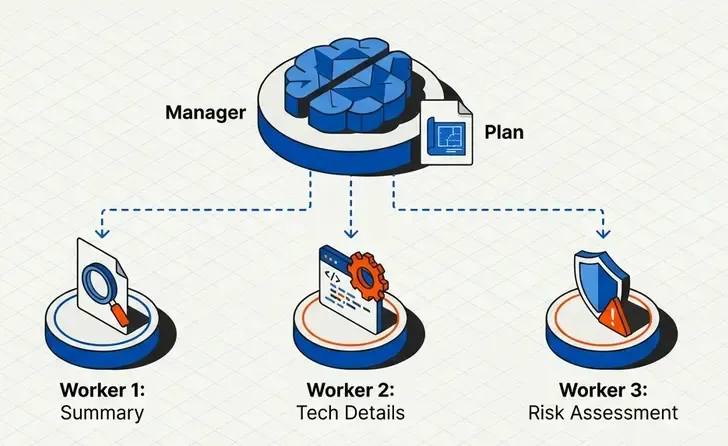
An orchestrator plans and delegates tasks to specialized workers.
When to Use
- Complex tasks that can be decomposed
- The number of subtasks isn’t known beforehand
- You need dynamic parallel processing
Use Case: Pentest Report Generator
The orchestrator divides the report into sections, workers generate each section:
from langgraph.types import Send
from typing import List

class Section(BaseModel):
    name: str = Field(description="Section name")
    description: str = Field(description="What this section should cover")

class Sections(BaseModel):
    sections: List[Section] = Field(description="Report sections")

# Planner LLM
planner = llm.with_structured_output(Sections)

class ReportState(TypedDict):
    target: str  # Pentest target
    sections: list[Section]
    completed_sections: Annotated[list, operator.add]  # Workers write here
    final_report: str

class WorkerState(TypedDict):
    section: Section
    completed_sections: Annotated[list, operator.add]

def orchestrator(state: ReportState) -> dict:
    """Plan the report sections."""
    plan = planner.invoke(f"""
    Create a penetration test report structure for target: {state['target']}
    Include: Executive Summary, Methodology, Findings, Risk Assessment, Recommendations
    """)
    return {"sections": plan.sections}

def section_writer(state: WorkerState) -> dict:
    """Worker that writes a section."""
    section = llm.invoke(f"""
    Write the '{state['section'].name}' section for a pentest report.
    Requirements: {state['section'].description}
    Use markdown formatting. Be professional and technical.
    """)
    return {"completed_sections": [f"## {state['section'].name}\n\n{section.content}"]}

def synthesizer(state: ReportState) -> dict:
    """Combine all sections."""
    report = "\n\n---\n\n".join(state["completed_sections"])
    return {"final_report": f"# Penetration Test Report\n\n{report}"}

def assign_workers(state: ReportState):
    """Create workers dynamically with Send()."""
    return [Send("writer", {"section": s}) for s in state["sections"]]

# Build workflow
orchestrator_workflow = StateGraph(ReportState)
orchestrator_workflow.add_node("orchestrator", orchestrator)
orchestrator_workflow.add_node("writer", section_writer)
orchestrator_workflow.add_node("synthesizer", synthesizer)

orchestrator_workflow.add_edge(START, "orchestrator")
orchestrator_workflow.add_conditional_edges("orchestrator", assign_workers, ["writer"])
orchestrator_workflow.add_edge("writer", "synthesizer")
orchestrator_workflow.add_edge("synthesizer", END)

report_generator = orchestrator_workflow.compile()
graph TB
START --> Orchestrator
Orchestrator -->|Send| W1[Writer 1]
Orchestrator -->|Send| W2[Writer 2]
Orchestrator -->|Send| W3[Writer N...]
W1 --> Synthesizer
W2 --> Synthesizer
W3 --> Synthesizer
Synthesizer --> END
⚡ Send() API: Allows creating workers dynamically based on state. Each
Send()creates an independent instance of the worker node.
Pattern 5: Evaluator-Optimizer
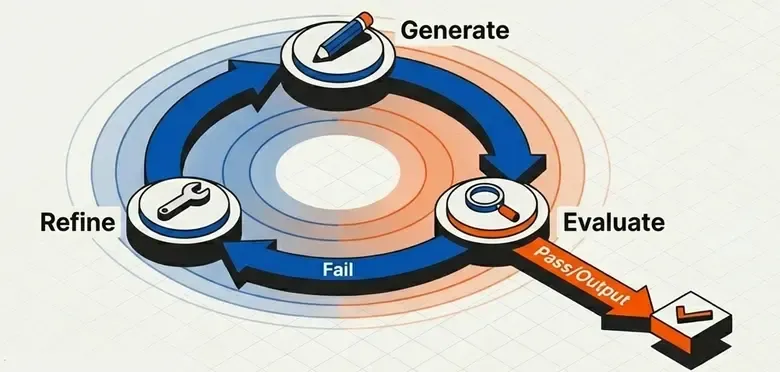
A loop of generate → evaluate → refine until reaching a quality criterion.
When to Use
- Output quality is critical
- You can define clear evaluation criteria
- The cost of iteration is acceptable
Use Case: Exploit Generator with Validation
Generate exploit code and validate it iteratively:
class ExploitState(TypedDict):
    vulnerability: str
    exploit_code: str
    feedback: str
    is_valid: bool
    iterations: int

class ExploitEval(BaseModel):
    is_valid: Literal["valid", "invalid"] = Field(
        description="Whether the exploit is syntactically correct and safe"
    )
    feedback: str = Field(
        description="Feedback to improve the exploit if not valid"
    )

evaluator = llm.with_structured_output(ExploitEval)

def generate_exploit(state: ExploitState) -> dict:
    """Generate or improve the exploit."""
    if state.get("feedback"):
        prompt = f"""
        Improve this exploit for {state['vulnerability']}.
        Previous code: {state['exploit_code']}
        Issues to fix: {state['feedback']}
        """
    else:
        prompt = f"Write a proof-of-concept exploit for: {state['vulnerability']}"

    msg = llm.invoke(prompt)
    return {
        "exploit_code": msg.content,
        "iterations": state.get("iterations", 0) + 1
    }

def evaluate_exploit(state: ExploitState) -> dict:
    """Evaluate the generated exploit."""
    eval_result = evaluator.invoke(f"""
    Evaluate this exploit code for:
    1. Syntactic correctness
    2. No dangerous side effects
    3. Clear documentation

    Code:
    {state['exploit_code']}
    """)
    return {
        "is_valid": eval_result.is_valid == "valid",
        "feedback": eval_result.feedback
    }

def should_continue(state: ExploitState) -> str:
    """Decide whether to continue iterating."""
    if state["is_valid"]:
        return "accepted"
    if state["iterations"] >= 3:  # Max 3 attempts
        return "max_iterations"
    return "retry"

# Build workflow
optimizer = StateGraph(ExploitState)
optimizer.add_node("generate", generate_exploit)
optimizer.add_node("evaluate", evaluate_exploit)

optimizer.add_edge(START, "generate")
optimizer.add_edge("generate", "evaluate")
optimizer.add_conditional_edges(
    "evaluate",
    should_continue,
    {
        "accepted": END,
        "max_iterations": END,
        "retry": "generate",  # Loop back
    }
)

exploit_generator = optimizer.compile()
graph TB
START --> Generate
Generate --> Evaluate
Evaluate -->|Valid| END
Evaluate -->|Max Iterations| END
Evaluate -->|Invalid + Feedback| Generate
🔄 Controlled iteration: Always set a maximum iteration limit to avoid infinite loops.
Pattern 6: ReAct Agents
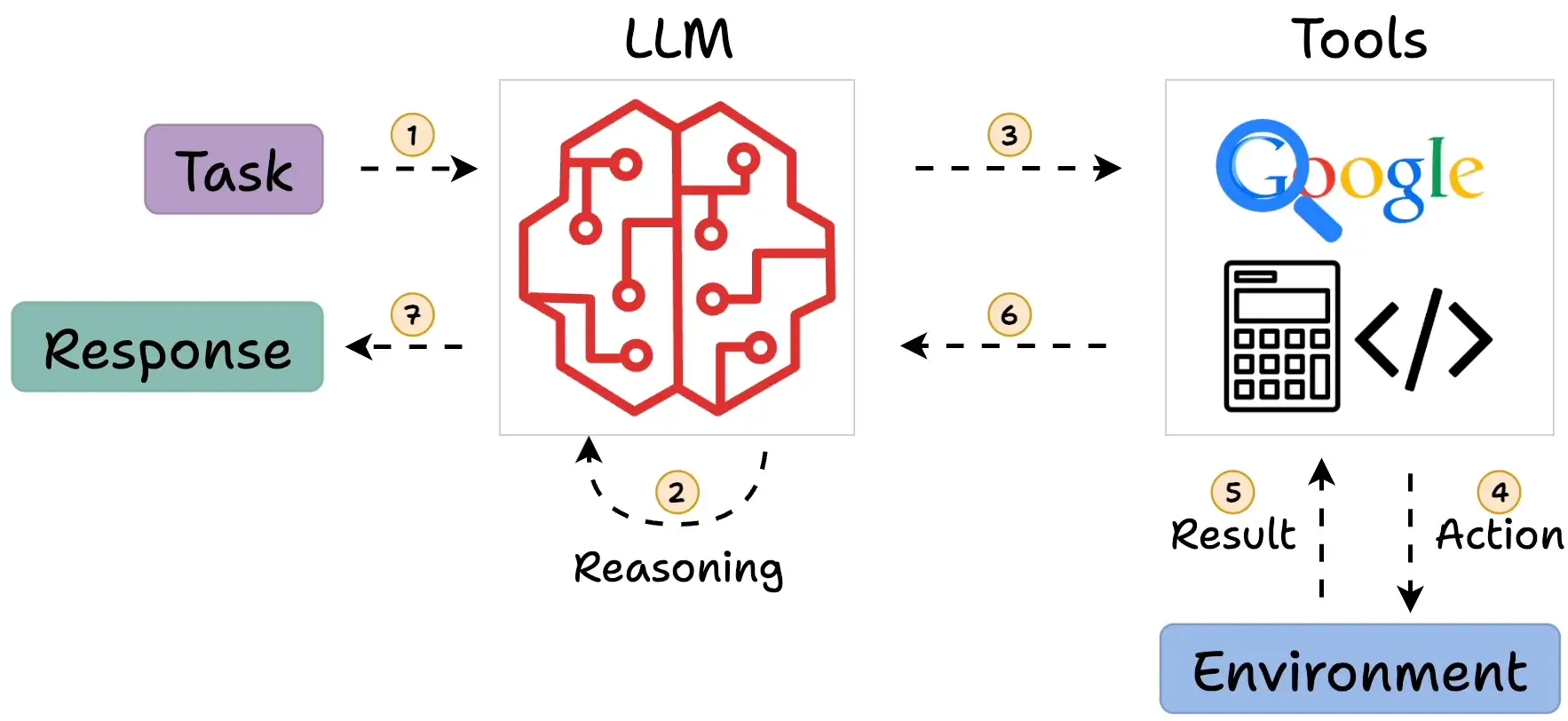
Agents that reason and act using tools autonomously.
When to Use
- The LLM needs to decide which tools to use
- The flow isn’t predictable
- You need flexibility over control
Use Case: Threat Intelligence Assistant
An agent that investigates threats using multiple tools:
from langchain_core.tools import tool
from langchain_core.messages import SystemMessage, HumanMessage, ToolMessage
from langgraph.graph import MessagesState

@tool
def search_cve(cve_id: str) -> str:
    """
    Search for CVE details in the NVD database.
    Use this when you need information about a specific vulnerability.
    """
    # Mock implementation
    return f"CVE {cve_id}: Remote Code Execution in Apache Log4j. CVSS: 10.0 CRITICAL"

@tool
def check_exploit_db(vulnerability: str) -> str:
    """
    Check if public exploits exist for a vulnerability.
    Use this to assess exploitability.
    """
    return f"Found 3 public exploits for {vulnerability} on ExploitDB"

@tool
def scan_network(target: str) -> str:
    """
    Scan a target for running services.
    Use this to identify potentially vulnerable services.
    """
    return f"Scan results for {target}: Port 8080 (Java), Port 22 (SSH)"

@tool
def generate_report(findings: str) -> str:
    """
    Generate a threat intelligence report from findings.
    Use this as the final step after gathering information.
    """
    return f"## Threat Intelligence Report\n\n{findings}"

# Configure tools
tools = [search_cve, check_exploit_db, scan_network, generate_report]
tools_by_name = {t.name: t for t in tools}
llm_with_tools = llm.bind_tools(tools)

def agent_node(state: MessagesState) -> dict:
    """The agent decides what to do."""
    response = llm_with_tools.invoke([
        SystemMessage(content="""You are a threat intelligence analyst.
        Use your tools to investigate security threats thoroughly.
        Always check for CVEs, exploits, and generate a final report."""),
        *state["messages"]
    ])
    return {"messages": [response]}

def tool_executor(state: MessagesState) -> dict:
    """Execute the requested tools."""
    results = []
    for tool_call in state["messages"][-1].tool_calls:
        tool = tools_by_name[tool_call["name"]]
        result = tool.invoke(tool_call["args"])
        results.append(ToolMessage(
            content=str(result),
            tool_call_id=tool_call["id"]
        ))
    return {"messages": results}

def should_continue(state: MessagesState) -> str:
    """Does the agent want to use more tools?"""
    last_message = state["messages"][-1]
    if hasattr(last_message, "tool_calls") and last_message.tool_calls:
        return "tools"
    return "end"

# Build agent
agent = StateGraph(MessagesState)
agent.add_node("agent", agent_node)
agent.add_node("tools", tool_executor)

agent.add_edge(START, "agent")
agent.add_conditional_edges("agent", should_continue, {"tools": "tools", "end": END})
agent.add_edge("tools", "agent")  # Loop back after tool execution

threat_analyst = agent.compile()

# Usage
result = threat_analyst.invoke({
    "messages": [HumanMessage(content="Investigate CVE-2021-44228 and check if we're vulnerable")]
})
graph TB
START --> Agent
Agent -->|Tool Calls| Tools
Tools --> Agent
Agent -->|No More Tools| END
The ReAct Pattern Explained
USER: "Investigate CVE-2021-44228"

AGENT:
  1. THOUGHT: I need to search for CVE details
  2. ACTION: search_cve("CVE-2021-44228")
  3. OBSERVATION: "RCE in Log4j, CVSS 10.0"

  4. THOUGHT: I should check for public exploits
  5. ACTION: check_exploit_db("Log4j")
  6. OBSERVATION: "Found 3 public exploits"

  7. THOUGHT: I have enough information, generating report
  8. ACTION: generate_report(findings)
  9. FINAL ANSWER: [Threat Intelligence Report]
Pattern 7: Supervisor Multi-Agent
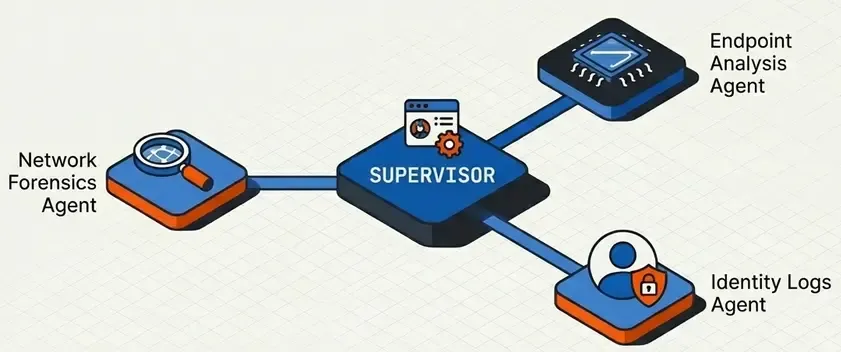
A supervisor agent coordinates specialized agents.
When to Use
- Different domains require different experts
- You want modularity and separation of concerns
- A single agent with many tools becomes unmanageable
Use Case: SOC Automation Platform
A supervisor coordinating specialized SOC agents:
from langgraph.graph import StateGraph, MessagesState, START, END

class SOCState(TypedDict):
    messages: list
    next_agent: str
    investigation: str
    response_actions: str

# Specialized agents
def triage_agent(state: SOCState) -> dict:
    """Initial triage agent."""
    msg = llm.invoke(f"""
    You are a TRIAGE specialist. Analyze the alert and determine:
    - Severity (Critical/High/Medium/Low)
    - Type (Malware/Intrusion/DataLeak/DDoS)
    - Initial assessment

    Alert: {state['messages'][-1].content}
    """)
    return {"investigation": f"TRIAGE:\n{msg.content}"}

def forensics_agent(state: SOCState) -> dict:
    """Forensic analysis agent."""
    msg = llm.invoke(f"""
    You are a FORENSICS specialist. Based on the triage:
    - Identify indicators of compromise
    - Trace the attack chain
    - Preserve evidence

    Previous analysis: {state['investigation']}
    """)
    return {"investigation": state["investigation"] + f"\n\nFORENSICS:\n{msg.content}"}

def response_agent(state: SOCState) -> dict:
    """Incident response agent."""
    msg = llm.invoke(f"""
    You are an INCIDENT RESPONDER. Based on the investigation:
    - Recommend containment actions
    - Define remediation steps
    - Create action items

    Investigation: {state['investigation']}
    """)
    return {"response_actions": msg.content}

# Supervisor
class SupervisorDecision(BaseModel):
    next_agent: Literal["triage", "forensics", "response", "done"] = Field(
        description="Which specialized agent should handle this next"
    )
    reasoning: str = Field(description="Why this agent is needed")

supervisor_llm = llm.with_structured_output(SupervisorDecision)

def supervisor(state: SOCState) -> dict:
    """Supervisor decides the next agent."""
    decision = supervisor_llm.invoke(f"""
    You are the SOC Supervisor. Based on the current state, decide which agent should act next.

    Available agents:
    - triage: Initial alert analysis (use first)
    - forensics: Deep investigation (use after triage)
    - response: Incident response (use after forensics)
    - done: Investigation complete

    Current investigation: {state.get('investigation', 'Not started')}
    Response actions: {state.get('response_actions', 'None yet')}
    """)
    return {"next_agent": decision.next_agent}

def route_to_agent(state: SOCState) -> str:
    return state["next_agent"]

# Build workflow
soc = StateGraph(SOCState)
soc.add_node("supervisor", supervisor)
soc.add_node("triage", triage_agent)
soc.add_node("forensics", forensics_agent)
soc.add_node("response", response_agent)

soc.add_edge(START, "supervisor")
soc.add_conditional_edges(
    "supervisor",
    route_to_agent,
    {
        "triage": "triage",
        "forensics": "forensics",
        "response": "response",
        "done": END,
    }
)
# All agents return to supervisor
for agent in ["triage", "forensics", "response"]:
    soc.add_edge(agent, "supervisor")

soc_platform = soc.compile()
graph TB
START --> Supervisor
Supervisor -->|triage| Triage[🔍 Triage Agent]
Supervisor -->|forensics| Forensics[🔬 Forensics Agent]
Supervisor -->|response| Response[🛡️ Response Agent]
Supervisor -->|done| END
Triage --> Supervisor
Forensics --> Supervisor
Response --> Supervisor
Pattern 8: Hierarchical Teams
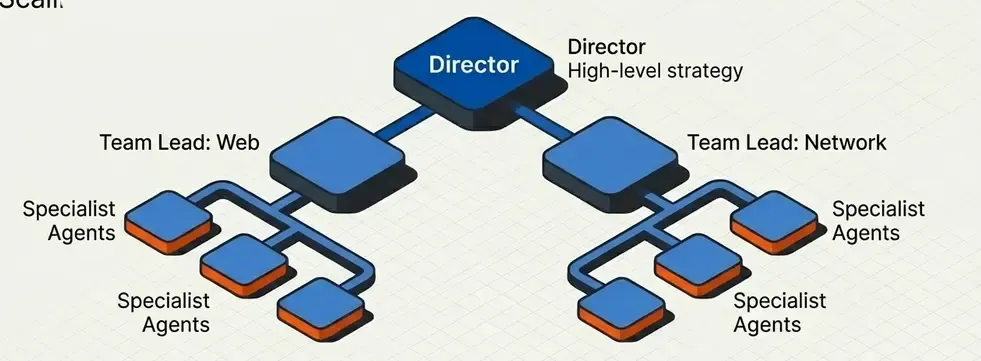
Multiple levels of supervision for very complex projects.
When to Use
- Large organizations with multiple teams
- Projects requiring deep specialization
- Need to scale horizontally
Use Case: Pentesting Company
Hierarchical structure with director, team leads, and pentesters:
# Level 1: Operations Director
class DirectorState(TypedDict):
    project: str
    teams_assigned: list
    team_results: Annotated[list, operator.add]
    final_deliverable: str

# Level 2: Team Leads
class TeamLeadState(TypedDict):
    scope: str
    team_name: str
    findings: Annotated[list, operator.add]
    team_report: str

# Level 3: Individual Pentesters
class PentesterState(TypedDict):
    target: str
    technique: str
    finding: str

# Director delegates to teams
def director(state: DirectorState) -> dict:
    """Director assigns scope to each team."""
    # Analyze project and decide which teams are needed
    teams = [
        {"name": "network_team", "scope": "Infrastructure and network testing"},
        {"name": "web_team", "scope": "Web application testing"},
        {"name": "social_team", "scope": "Social engineering assessment"},
    ]
    return {"teams_assigned": teams}

def create_team_subgraph(team_name: str):
    """Factory to create team subgraphs."""

    def team_lead(state: TeamLeadState) -> dict:
        msg = llm.invoke(f"As {team_name} lead, plan testing for: {state['scope']}")
        return {"team_report": msg.content}

    team = StateGraph(TeamLeadState)
    team.add_node("lead", team_lead)
    team.add_edge(START, "lead")
    team.add_edge("lead", END)

    return team.compile()

# Teams can be complete subgraphs
network_team = create_team_subgraph("Network")
web_team = create_team_subgraph("Web")
social_team = create_team_subgraph("Social Engineering")

def route_to_teams(state: DirectorState):
    """Send work to all teams in parallel."""
    return [
        Send("network_team", {"scope": t["scope"], "team_name": t["name"]})
        for t in state["teams_assigned"]
    ]

def compile_results(state: DirectorState) -> dict:
    """Compile results from all teams."""
    return {"final_deliverable": "\n\n".join(state["team_results"])}
graph TB
subgraph "Level 1: Direction"
Director
end
subgraph "Level 2: Team Leads"
NetworkLead[Network Team Lead]
WebLead[Web Team Lead]
SocialLead[Social Engineering Lead]
end
subgraph "Level 3: Specialists"
N1[Network Pentester 1]
N2[Network Pentester 2]
W1[Web Pentester 1]
W2[API Pentester]
S1[Phishing Specialist]
end
Director --> NetworkLead
Director --> WebLead
Director --> SocialLead
NetworkLead --> N1
NetworkLead --> N2
WebLead --> W1
WebLead --> W2
SocialLead --> S1
Pattern Selection Guide
Decision Matrix
| Criterion | Prompt Chain | Parallel | Routing | Orchestrator | Evaluator | ReAct | Supervisor | Hierarchical |
|---|---|---|---|---|---|---|---|---|
| Complexity | ⭐ | ⭐⭐ | ⭐⭐ | ⭐⭐⭐ | ⭐⭐⭐ | ⭐⭐⭐⭐ | ⭐⭐⭐⭐ | ⭐⭐⭐⭐⭐ |
| Determinism | ✅ High | ✅ High | 🔶 Medium | ✅ High | 🔶 Medium | ❌ Low | 🔶 Medium | 🔶 Medium |
| Latency | 🟡 Medium | ✅ Low | ✅ Low | 🟡 Medium | 🔴 High | 🔴 High | 🔴 High | 🔴 Very High |
| Cost | 💰 | 💰💰 | 💰 | 💰💰 | 💰💰💰 | 💰💰💰 | 💰💰💰💰 | 💰💰💰💰💰 |
| Maintainability | ✅ Easy | ✅ Easy | ✅ Easy | 🔶 Medium | 🔶 Medium | 🔶 Medium | 🔴 Hard | 🔴 Hard |
Decision Tree
graph TD
    Q1{Predictable flow?}
    Q1 -->|Yes| Q2{Independent tasks?}
    Q1 -->|No| Q3{Need tools?}

    Q2 -->|Yes| Parallel[Parallelization]
    Q2 -->|No| Q4{Different input types?}

    Q4 -->|Yes| Routing[Routing]
    Q4 -->|No| Q5{Dynamic subtasks?}

    Q5 -->|Yes| Orchestrator[Orchestrator-Worker]
    Q5 -->|No| Q6{Quality critical?}

    Q6 -->|Yes| Evaluator[Evaluator-Optimizer]
    Q6 -->|No| Chain[Prompt Chaining]

    Q3 -->|Yes| Q7{Multiple domains?}
    Q3 -->|No| ReAct[ReAct Agent]

    Q7 -->|Yes| Q8{Multiple levels?}
    Q7 -->|No| ReAct

    Q8 -->|Yes| Hierarchical[Hierarchical Teams]
    Q8 -->|No| Supervisor[Supervisor]
Recommendations by Project Type
| Project | Recommended Pattern | Justification |
|---|---|---|
| Simple Chatbot | Prompt Chaining | Predictable flow, low cost |
| Document Analysis | Parallelization | Multiple independent analyses |
| Ticket System | Routing | Different types need different handlers |
| Report Generation | Orchestrator-Worker | Divide and conquer |
| Code Generation | Evaluator-Optimizer | Code quality is critical |
| General Assistant | ReAct Agent | Maximum flexibility |
| SOC Automation | Supervisor | Multiple coordinated specialties |
| Enterprise Platform | Hierarchical | Organizational scalability |
Conclusions
Key Takeaways
- Start simple: Use Prompt Chaining until you need more
- Workflows vs Agents: Prefer workflows when flow is predictable
- Parallelize when possible: Significantly reduce latency
- Routing for specialization: Better than a mega-prompt
- Evaluator for quality: When output must be perfect
- Supervisor for teams: When you need multiple experts
- Always measure: Latency, costs, and quality before adding complexity
Next Steps
- Implement these patterns with LangGraph
- Integrate observability with LangSmith
- Deploy to production with LangGraph Platform